Features

Everything you need to raise more on the night

Sell tables as well as seats, let every supporter answer for themselves, seat the room in one click and hand your venue live numbers instead of a spreadsheet. The screens below are the real thing — click any of them and use it yourself.

Supporters check out without an account Allergies captured per guest, not per table Automated seating with group rules Live pack for the venue

The five that do the heavy lifting

Real captures from the working product. Every one of them is a screen your table hosts, your supporters or your team will actually use.

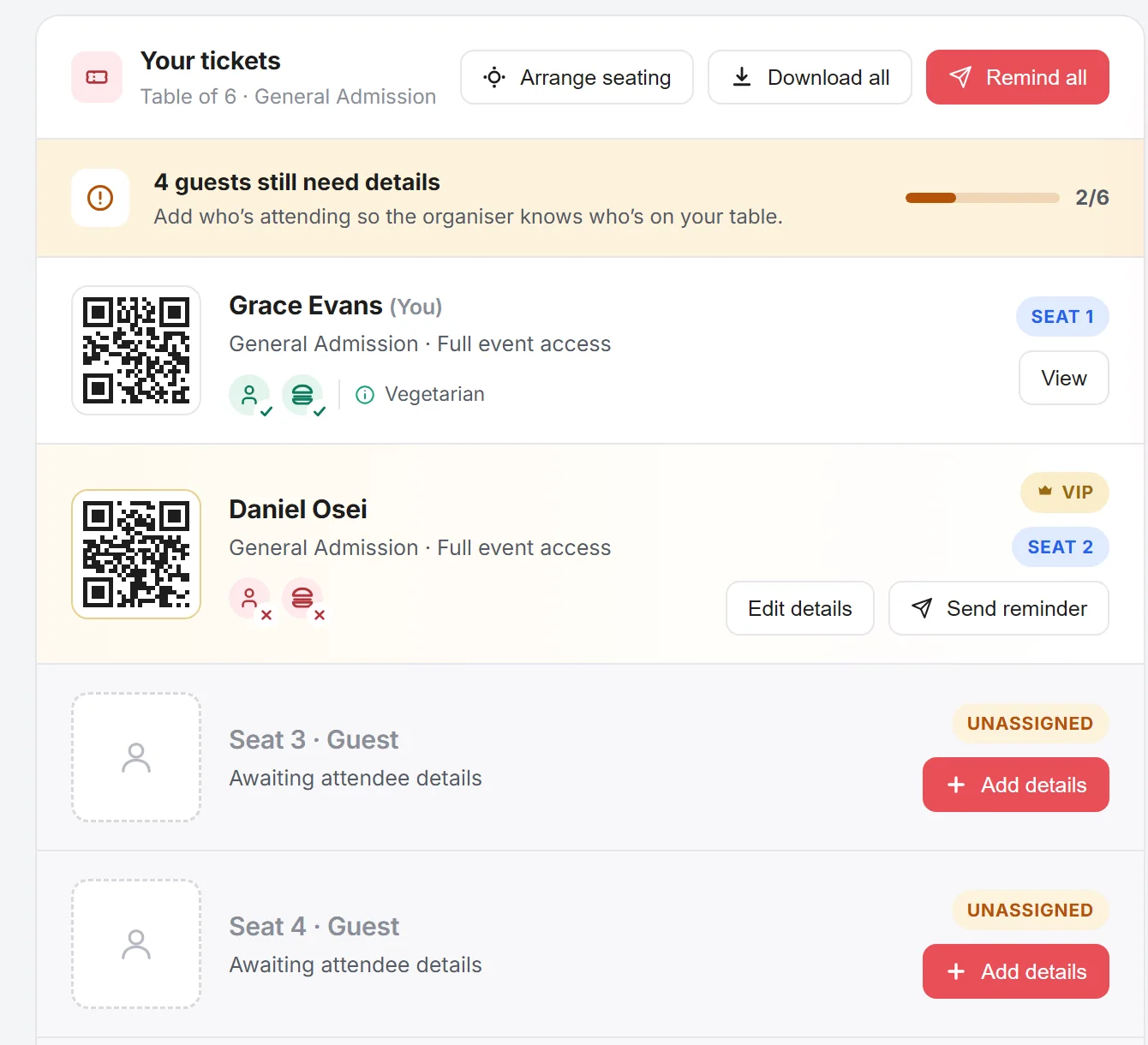
A confirmed table of six. A banner reads four guests still need details with a two of six progress bar. Grace Evans is seated with a vegetarian flag, Daniel Osei is marked VIP with edit details and send reminder buttons, and seats three and four are unassigned with an add details button each.

The table host names their guests, not you

A supporter buys a table of ten for the gala and gets a page with a seat for every ticket. They fill in who is coming, what each person eats and anything the room needs to know. Nobody on your team chases a single name.

  • Every unnamed seat shows as a prompt with a progress meter
  • A reminder button does the chasing for you
  • Dietaries and access needs recorded per guest
  • Table hosts and VIPs flagged for the night
Try the table host's view

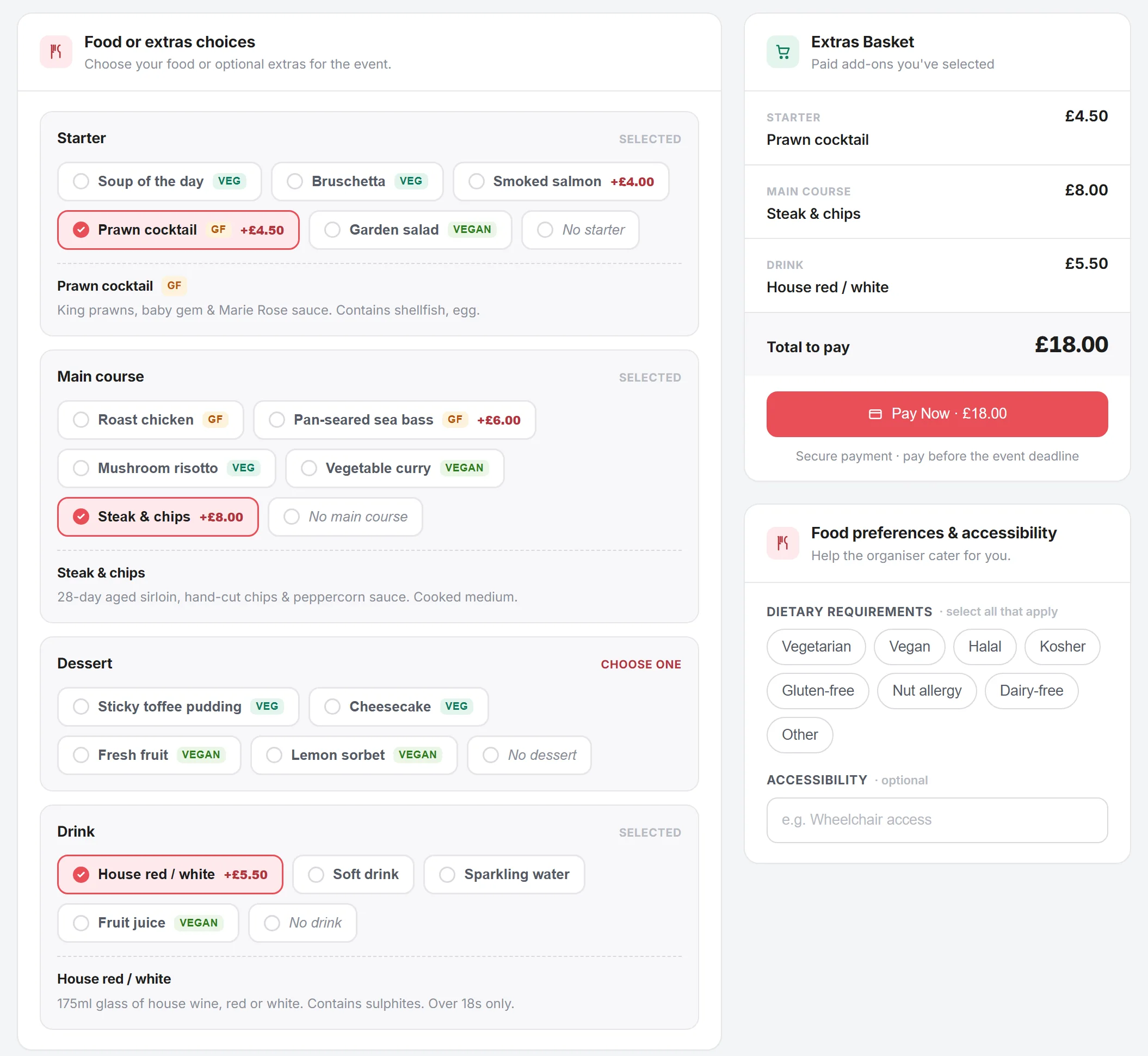
A guest choosing their own starter, main, dessert and drink, with dietary tags on each dish and an extras basket totalling eighteen pounds behind a pay now button.

Supporters pick their own menu and pay for their own extras

Once they are named, every guest gets their own link. They confirm they are coming, choose a course at a time, declare what they cannot eat and buy their own wine for the table. The table host never relays an order and you never chase one.

  • A course at a time, with dietary tags on every dish
  • Allergies and access needs from the person who knows
  • Paid upgrades land in the guest's own basket, not the host's
  • No account needed to answer

Try the supporter's view

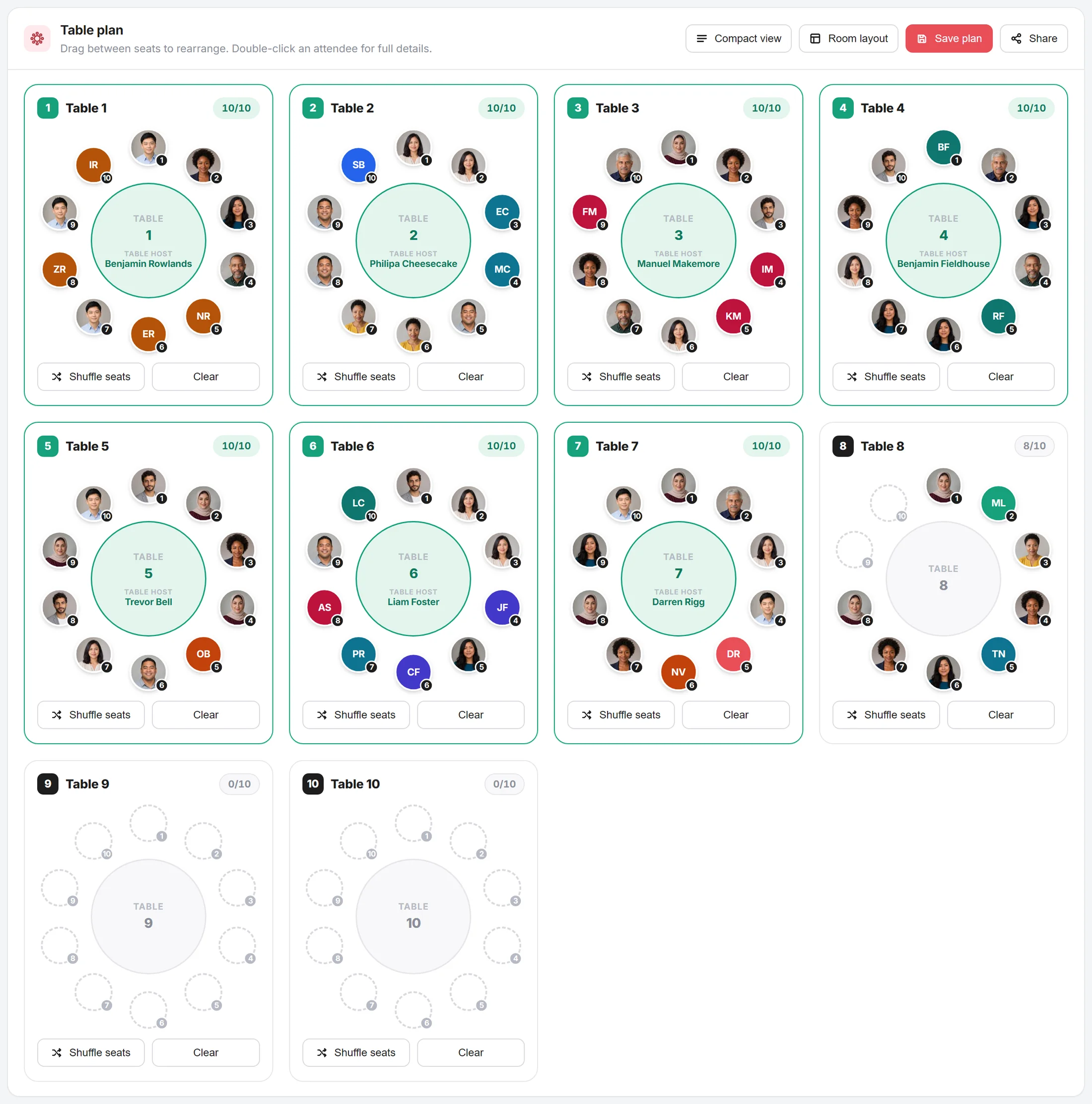
The table plan after auto-allocation: tables one to seven full at ten of ten with a named host each, table eight holding eight, and two spare tables left empty.

Seat the whole room in one click

Set the table count and size, choose how to fill them, and every booking and individual supporter gets placed. Tables bought together stay together, hosts are named, and your spare tables stay empty instead of being padded out. Drag anyone the rules got wrong.

  • Table bookings kept together, individuals filled around them
  • Shuffle, unassign or drag any single seat
  • Allergies and accessibility visible at a glance
  • Saved plans go straight to the venue pack

Try the seating tool

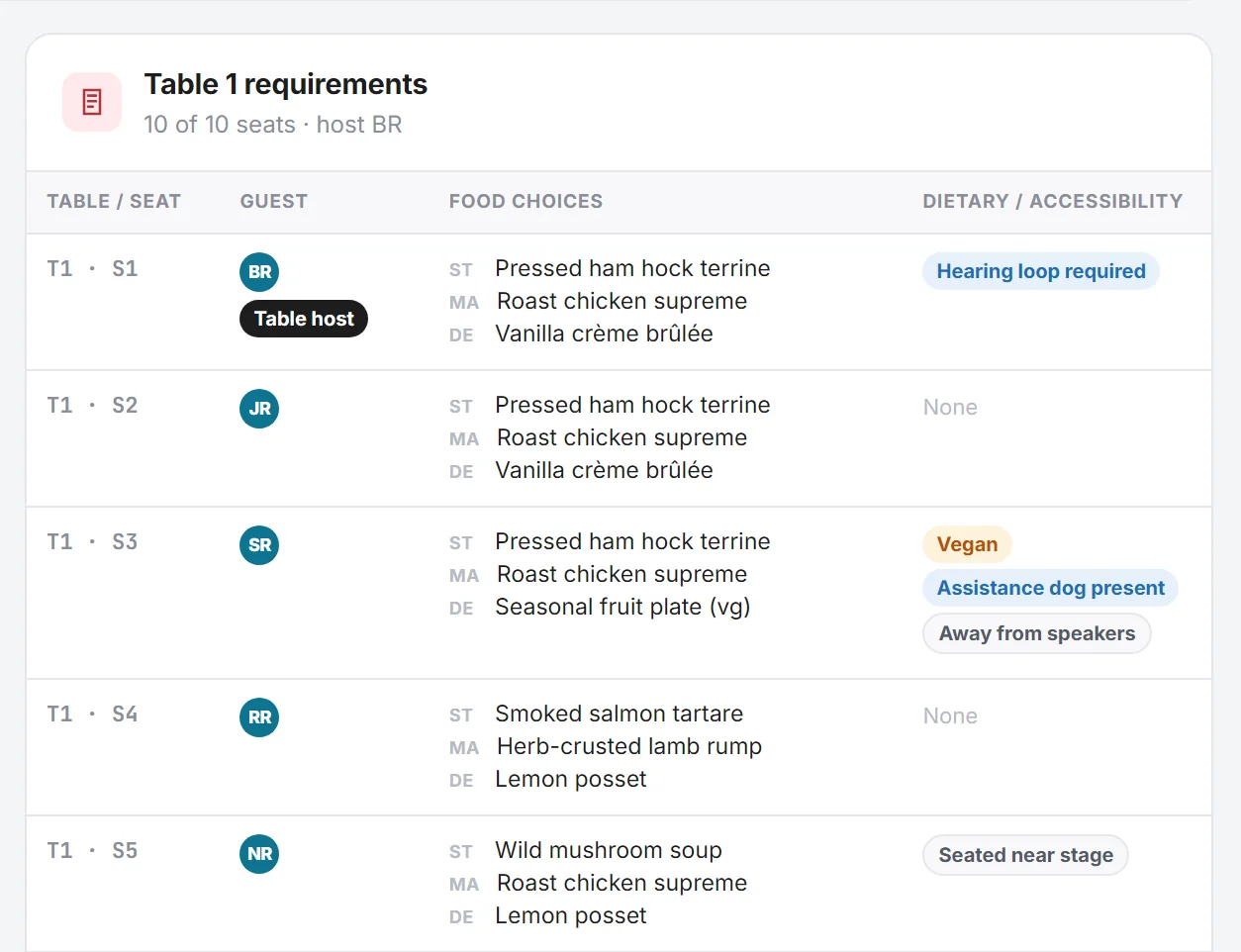
The venue's view of table one: five seats listed by seat number, each with the guest's initials, their starter, main and dessert, and their dietary or access needs — hearing loop required, vegan, assistance dog present, away from speakers and seated near stage.

Your venue gets live numbers, not a spreadsheet

One read-only link gives the venue and the kitchen the room layout, the covers per dish and every allergy, keyed to seat numbers. It updates as bookings change, and no supporter's name or contact details travel with it.

  • Course counts per table for the kitchen
  • Table and seat selections shared
  • Seating positions, table hosts and VIPs
  • Allergies and access needs by seat
  • Supporter data anonymised before it leaves you

Try the venue data share

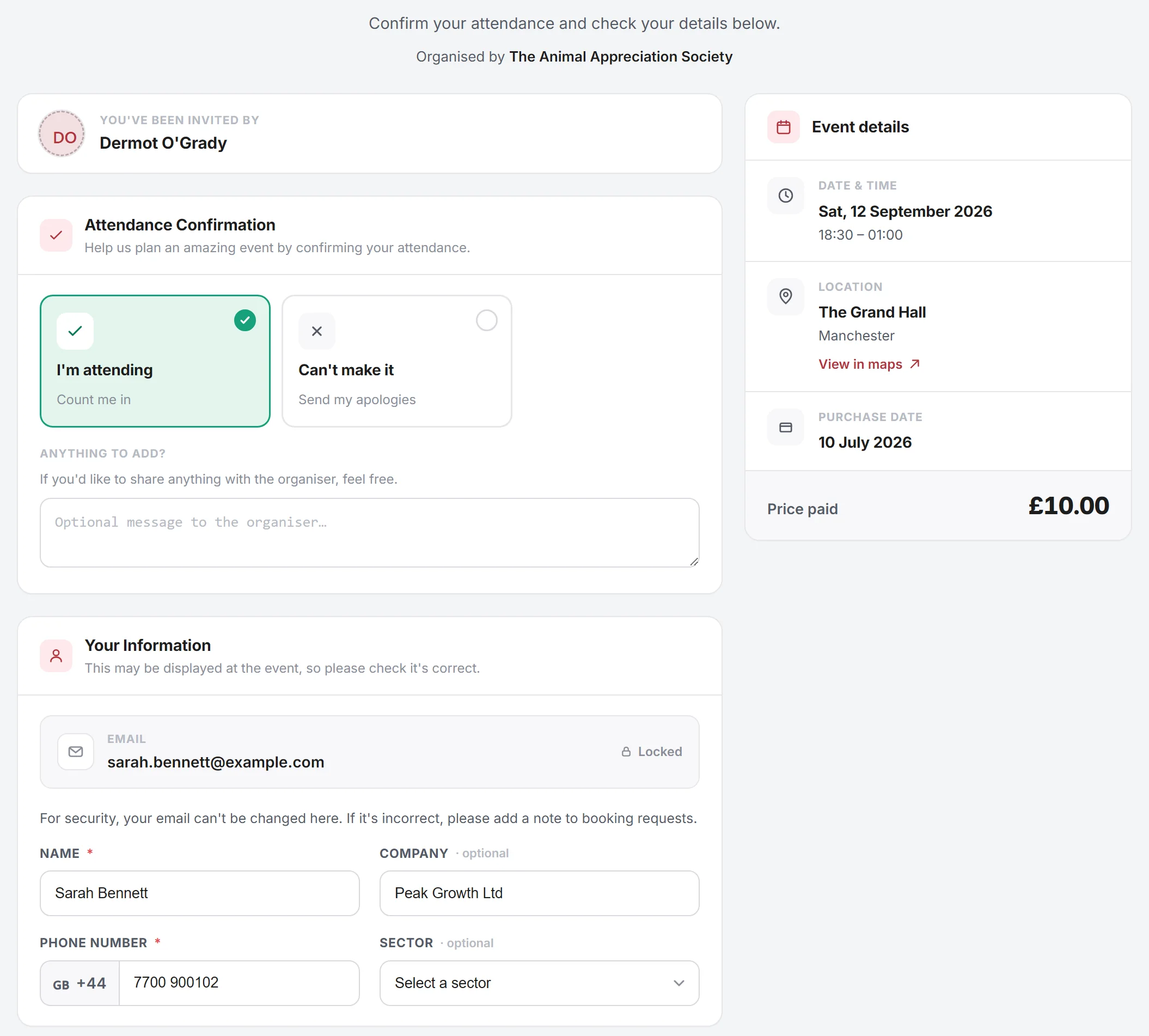
A guest's confirmation screen showing the event, their seat and a large confirm attendance button, with the option to pass the ticket on if they cannot make it.

Know who is actually coming

Every guest confirms in a click, and anyone who has not answered gets reminded automatically. On the night you check supporters in against the same list, so the numbers you give the venue are the numbers who walk through the door.

  • One-click confirmation, no account to create
  • Automatic reminders to anyone still silent
  • Check-in and attendance tracked on the day
  • Drop-outs show up before the kitchen commits

See the confirmation screen

The admin that eats your fundraising time

The parts nobody puts on a poster, and the parts that decide whether the night is worth running again.

Supporter and guest pricing

Price the same fundraiser differently for members, their guests and the public. Who someone is gets checked at checkout, so the supporter rate cannot leak out on a shared link.

Coupons and early-bird rates

Run a discount for a corporate partner, an early-bird window or a code for your committee, with limits on how many times each one can be used.

Sponsors, billed properly

Bring sponsors on board and give each one the billing they were promised on the event page, in the pack and on the night.

Exhibitor management

Running a fundraising fair or a charity expo? Take exhibitor bookings alongside the tickets and keep both lists in one place.

Email and message everyone

Send the running order, the dress code or the parking instructions to every attendee, a single table, or only the people who still owe you an answer.

Automated invoicing

Corporate tables that need an invoice get one automatically, so the finance side of the fundraiser runs itself while you plan the night.

Put your next fundraiser on Charity Hub

Start with one event. If the first one saves you an evening of admin, move the rest of the calendar across.